White-background rendering requirements for furniture product pages
Framing, material detail, shadows and channel-specific exports for a consistent product catalogue.
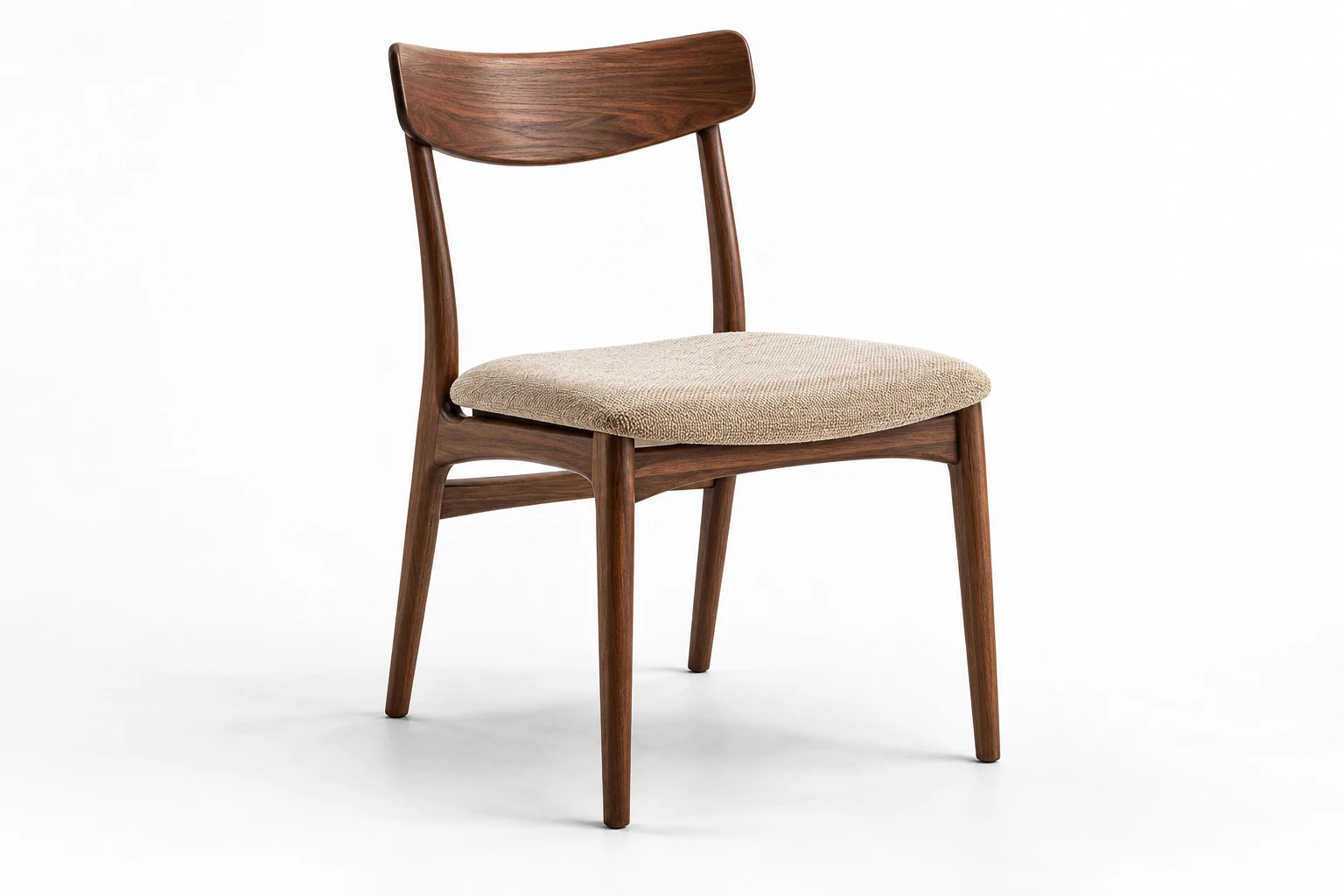
A good white-background furniture render must show the correct product, finish and proportions; use consistent framing; preserve material detail; and meet the rules of the product page or marketplace where it will be published.
There is no universal specification for every e-commerce channel. Marketplace main-image rules can be more restrictive than a brand’s own visual guidelines, while platforms such as Shopify give merchants more control. A practical approach is to create one accurate, flexible master asset and prepare channel-specific exports from it.
This guide covers the practical requirements for furniture product detail pages (PDPs), including framing, lighting, shadows, platform rules and final quality control.
These exports belong to a broader product story. See the PDP pack guide for the role of dimensions, details and context, or compare CGI with photography when deciding how to produce the images.
Key takeaways
- White background does not mean every platform requires the same image.
- Product accuracy, readable materials and consistent framing matter as much as background color.
- Marketplace main images may have stricter rules than a brand-owned PDP; check the destination, category and image type.
- Keep one flexible production master and prepare channel-specific exports.
What counts as a white-background furniture render?
A white-background render is an isolated product image without a lifestyle environment or decorative scene. It is commonly used as a main product image, catalog view or marketplace asset.
Furniture still needs enough lighting and tonal separation to communicate form: a white sofa should not disappear into the background, and dark upholstery, chrome or glass should remain readable. The goal is a neutral presentation that preserves form and material detail.
This guide focuses on catalog imagery for new products. A render of an ideal new item does not document the condition of a specific used, damaged or defective piece. For those listings, use photographs of the actual item and its relevant wear or defects. eBay specifically prohibits stock photos for used, damaged or defective items. See eBay’s picture policy.
What are the core requirements for furniture product-page renders?
The exact output depends on the channel, but a reliable furniture standard should cover the following areas.
| Requirement | Recommended production standard | Why it matters |
|---|---|---|
| Product accuracy | Match approved geometry, dimensions, visible construction and selected finish | The render must represent the product being sold |
| Background | Create a high-resolution master in which the background and contact shadow remain separately adjustable, then prepare either flattened white-background files or transparent exports as required | Different channels have different rules |
| Framing | Keep the complete product visible with controlled, repeatable margins | Prevents inconsistent galleries and tiny-looking products |
| Camera | Use a consistent camera height, focal length and angle within a product family | Makes related SKUs easier to compare |
| Contact with ground | Make the product feel supported rather than floating | Preserves weight and realism |
| Shadows | Keep them subtle and channel-appropriate | Helps form without creating visual clutter |
| Materials | Preserve fabric texture, wood grain, gloss, metal and glass behavior | Furniture purchase decisions depend heavily on finish |
| Edges | Keep silhouettes clean, with smoothly anti-aliased edges | Especially important on white backgrounds |
| Color | Use an approved color-managed workflow and export web deliverables in sRGB | Reduces avoidable color shifts |
| Output size | Render large enough for zoom and future crops | Avoids rebuilding assets for each placement |
| Text and graphics | Keep the main packshot free of unapproved text, badges and overlays | Several marketplaces restrict added graphics |
These are production recommendations rather than one marketplace’s universal policy. The publishing channel should always be checked before final export.
What do major platforms currently require?
Platform rules can change, so marketplace-specific specifications should be checked again before launch. Distinguish mandatory limits from suggested production sizes, and confirm whether rendered imagery is accepted for the intended category and image slot.
| Platform | Current image rules relevant to white-background furniture |
|---|---|
| Amazon | Amazon’s public photography guidance describes a white background of RGB 255, 255, 255 for most product shots and recommends filling 85% or more of the frame. This is general guidance, not verification of every category’s current rules. Before delivery, check the applicable main-image requirements, permitted image types and restrictions on added text or graphics in Seller Central. Amazon photography guidance and Product Image Guide |
| eBay | Its picture policy requires at least 500 px on the longest side and prohibits added borders, text, artwork, marketing material and watermarks. Its photo tips suggest around 1600 × 1600 px and generally favor white backgrounds. That square size is a recommendation, not a universal requirement. eBay Picture Policy and Adding Pictures to Listings |
| Shopify | Shopify’s product-media guidance does not impose a white background. Product and collection images can be up to 5000 × 5000 px or 25 megapixels and must be smaller than 20 MB. It recommends 2048 × 2048 px for square product images and a consistent aspect ratio for consistent display; neither makes a square image mandatory for every store. Shopify Product Media Types |
| Other retailers and marketplaces | Use the retailer’s current supplier or image brief. Do not assume that Amazon’s white-background or 85% frame-fill rule applies everywhere. |
Where the destination accepts CGI, a marketplace main image and a brand-owned white-background PDP image may come from the same approved scene without being identical files. A white background alone does not establish marketplace compliance.
Requirements may also vary by marketplace region, product category and image type. Always verify the current local and category-specific guidance before delivery.
How should furniture be framed in a white-background render?
The product should feel large enough to inspect without being cramped against the edges. For a brand-owned PDP, define a repeatable camera and margin standard for each furniture category rather than forcing chairs, sofas and wardrobes into one identical composition.
Useful rules include:
- keep the full silhouette visible;
- maintain consistent camera direction across comparable SKUs;
- avoid extreme perspective distortion;
- leave enough margin for responsive crops;
- check both thumbnail and full-PDP views.
A three-quarter view is often a strong main angle because it shows width, depth and construction together, but front or side views may be clearer for specific products.
A complete PDP usually needs more than one isolated image: main three-quarter, front or side views, relevant close-ups, dimension graphics and selected variants.
Amazon’s frame-fill guidance should not be applied as a universal composition rule for every furniture catalog. Check the exact requirement for the destination before locking the crop.
Should white-background furniture renders have shadows?
Yes, when the publishing channel allows it.
For a brand-owned PDP, a subtle contact shadow can help furniture feel grounded. Avoid hard theatrical shadows, large gray gradients and mirror-like floor reflections unless they are part of the brand art direction.
For marketplace main images, check the current platform, regional and category guidance before deciding how to handle contact shadows, gradients or reflections. Amazon’s general white-background guidance does not by itself settle every category’s shadow treatment. Consult the Product Image Guide and, where relevant, Non-White Background Error guidance in Seller Central. These pages may require seller access; do not assume a universal ban on all contact shadows or a universal permission to use them. A separate brand-PDP version can retain a subtle contact shadow where it suits the art direction.
Keeping the background and contact shadow adjustable until final export makes both marketplace and brand-PDP versions easier to produce.
How should difficult furniture materials be handled?
White backgrounds expose material problems quickly. Common checks include:
- Light upholstery: preserve seams, piping, cushion volume and texture without turning the fabric gray.
- Dark upholstery: keep folds, weave and edge detail visible instead of crushing shadows.
- Leather: preserve natural grain, creases, seams and controlled highlights without making the surface look plastic.
- Wood: verify grain scale and direction on each component.
- Metal: use reflections to explain form without making every finish look polished.
- Glossy and lacquered surfaces: retain smooth highlight transitions and controlled reflections; avoid clipped whites that erase curvature and edge definition.
- Glass: use controlled edge definition and reflections so transparent parts remain readable.
Material accuracy starts before rendering.
What resolution, format and color space should be delivered?
There is no universal delivery resolution for every furniture PDP. Define the exact pixel dimensions, aspect ratio, maximum file size and zoom requirements for each destination. The master should be at least as large as the largest planned export, with additional resolution where recropping requires it, and preserve enough information for background changes and future channel derivatives.
For web delivery:
- use sRGB unless the target platform specifies otherwise;
- use JPEG, WebP or AVIF for flattened web images where supported;
- use PNG when transparency or lossless delivery is required;
- if future background replacement is expected, agree whether delivery includes a transparent export, separate object mask or clipping path, and whether the contact shadow is supplied separately;
- make sure marketplace exports use formats accepted by the destination platform;
- use a consistent aspect ratio within the same gallery system;
- verify the final file after platform compression or automatic resizing.
Clipping paths work best for hard-edged products, while alpha masks are more suitable for fabric edges, glass and semitransparent details.
A practical white-background rendering workflow
A scalable workflow can be kept to six stages.
1. Define the channel requirements
List every destination and record its accepted image types, background, dimensions, aspect ratio and restrictions on text or graphics. Record shadow requirements where the channel specifies them.
2. Approve the product
Confirm geometry, dimensions, material assignment and the selected variant before producing the final image set.
3. Lock the camera and catalog standard
Approve the camera, views, product scale in frame and category-specific margins, then reuse the standard across related SKUs.
4. Light for form and material readability
Use controlled lighting that shows upholstery, wood, metal and construction details without creating unnecessary drama.
5. Render a flexible master
Keep enough control over the background and shadow to produce more than one channel version. The same approved 3D scene can often be reused, but the same final file should not automatically be sent everywhere. Avoid baking platform-specific compromises into the only master asset.
6. Export and quality-check each channel version
Check background values, crop, product fill, edges, color, file size, format and prohibited overlays, then preview the image in the real PDP or marketplace environment.
What should be checked before delivery?
Before delivery, check:
- correct product revision and variant;
- approved camera angle;
- no unintended crop;
- consistent visual scale across comparable SKUs and within each category standard;
- correct white value for channels that specify one;
- readable light and dark materials;
- clean contact with the floor;
- no distracting reflections;
- clean silhouette and anti-aliased edges;
- correct color space;
- correct pixel dimensions and aspect ratio;
- no prohibited text, badges, logos or watermarks;
- filename and alt text prepared, if included in scope;
- final image checked after upload.
Google recommends short, descriptive filenames and useful alt text that describes the image in context rather than stuffing keywords. See Google Image SEO best practices.
Use descriptive filenames such as brand-collection-lounge-chair-beige-front.webp instead of render_final_v2.png. Alt text should describe the actual product and view in context, for example: “Front view of the [Product Name] lounge chair with beige upholstery and an oak frame.” Avoid repeating keywords that do not help users understand the image.
Frequently asked questions
Does a furniture PDP always need a pure white background?
No. A brand-owned store can choose its own style. Pure white is mandatory where the platform or retailer requires it. Amazon’s public guidance describes RGB 255, 255, 255 for most product shots, but the current rules for the specific marketplace and category still need to be checked.
Can a white-background render have a shadow?
Yes, where the channel allows it. A subtle contact shadow can improve a brand-owned PDP, while marketplace main images should follow the platform-specific rule.
Is a transparent PNG the same as a white-background image?
No. Transparency and white are different outputs. A transparent export can be useful in production, but it is not the same as a flattened white-background image.
Should every furniture SKU use exactly the same camera?
Related products should follow a consistent visual system, but sofas, chairs and wardrobes may need different category-specific framing standards.
Can the same 3D model be used for white-background and lifestyle renders?
Usually, yes. Once the product model and materials are approved, the same asset can support isolated product views, lifestyle scenes, variants and other outputs, although each scene still needs its own lighting, camera and production work.
Conclusion
White-background furniture rendering works best as a controlled catalog system. The product should remain accurate and readable while framing, background treatment and file delivery are adapted to each sales channel.
Planning a consistent set of product-page visuals for a furniture collection? Explore our furniture 3D rendering services or send us your product references and channel requirements for scope review.
Sources
- Amazon: Product photography guidance
- Amazon Seller Central: Product Image Guide
- Amazon Seller Central: Non-White Background Error
- eBay: Picture Policy
- eBay: Adding Pictures to Your Listings
- Shopify Help Center: Product Media Types
- Google Search Central: Image SEO Best Practices
Put the thinking into practice.
Explore the relevant studio service, then tell us what you are planning.
Explore the service