Exploded-view animation for products: when and how to use it
Reveal hidden structure and component relationships without confusing an explanation with an assembly manual.
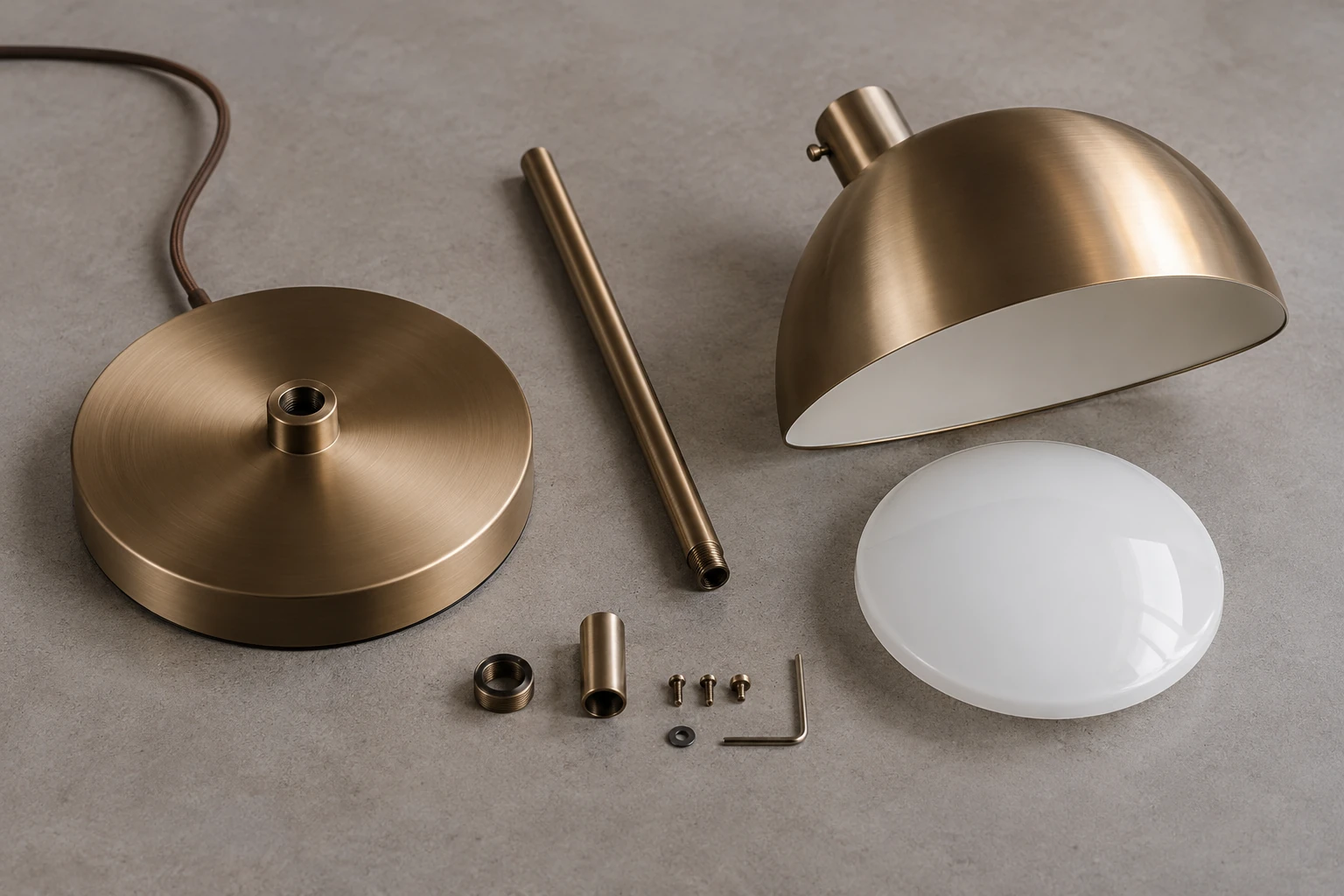
Exploded view animation shows selected product components moving away from their assembled positions so viewers can understand what is inside and how the parts relate to the whole. It can reveal construction that an exterior image cannot explain clearly.
The format is useful for furniture mechanisms, lighting assemblies, connectors, internal layers and replaceable components. Its purpose is to make a particular relationship understandable, not to animate every part simply because the model contains it.
A clear sequence establishes the assembled product, separates the relevant groups and gives viewers time to understand them. It may then hold the exploded arrangement or return to the assembled state. This guide explains when animation adds value, when still images are enough and what a production team needs to prepare.
Start with the broader animation-versus-static comparison if the format is still undecided. For a furniture mechanism, the model input guide helps identify the references needed to avoid inventing hidden construction.
Key takeaways
- Exploded views can explain hidden construction and component relationships.
- Animation, assembly instructions, cutaways and mechanism demonstrations have different purposes.
- Diagrammatic separation paths are not necessarily physical disassembly or installation instructions.
- A still-image sequence can illustrate separation and reassembly; animation adds continuous motion and timing.
- Reliable product data and appropriately qualified review matter when depicting a real product.
What is exploded view animation?
An exploded view animation is a 3D sequence in which selected parts separate while their relationship to the assembled product remains understandable. Components may move along different axes to reveal layers, connections or internal groups.
A pendant light, for example, might be shown as a housing, diffuser and mounting assembly. The useful grouping depends on the message. A marketing film may need only the major elements, while a technical presentation may require more detailed identification.
The displayed spacing is usually chosen for readability. Parts can be spread further apart than they would move during actual servicing. That visual convention should not imply that a viewer can remove them in the same order or direction without additional steps.
Exploded view, assembly, cutaway and mechanism animation
These formats can overlap, but they answer different questions.
| Format | Main question | Typical application |
|---|---|---|
| Exploded view animation | What are the important parts and how do they relate? | Construction, product features and technical marketing |
| Assembly animation | How should parts be connected, in what verified sequence? | Reviewed installation or training content |
| Cutaway animation | What is inside while the object remains assembled? | Internal systems, layers and concealed components |
| Mechanism animation | How does the product move during use? | Hinges, recliners, adjustment systems and machinery |
| Turntable animation | What does the product look like from different sides? | General exterior presentation |
One video can combine several approaches. A chair may first demonstrate an approved adjustment movement, then separate selected components to show the mechanism's location. The transition should make the change from functional motion to diagrammatic explanation clear.
If the audience needs to perform installation or maintenance, the brief must include the manufacturer's validated procedure and technical review. A persuasive marketing sequence does not become an instruction manual simply by adding numbered labels.
When is an exploded view useful?
When important construction is hidden
An exterior render can communicate form and finish but leave internal construction invisible. An exploded sequence can expose a concealed support, mounting system or layered structure while preserving a visual connection with the finished product.
Use it when that information answers a real buyer or sales-team question. Showing more internal parts is not automatically more informative. Select components because they explain the feature, not because they are easy to animate.
When relationships are difficult to follow
Modular furniture, fittings and lighting assemblies may contain several connected groups. A controlled sequence can introduce them one at a time so the viewer does not have to decode a crowded diagram immediately.
For a simple relationship, a labeled still may be clearer. Motion earns its place when the changing positions, the order of explanation or the transition between assembled and separated states adds useful information.
When photography cannot easily show the feature
Photographing hidden construction may require disassembly or a specially prepared sample. CGI can separate modeled parts while retaining consistent framing, lighting and materials.
Production can also begin before manufacture when the design is sufficiently defined. The image then represents the approved design information available, not evidence that a finished sample has been built or tested. See our guide to product visuals before a physical prototype exists.
When sales teams need a focused explanation
A short sequence can help explain the location and relationship of parts behind a feature. Pair the visual with specific, supportable language. Showing a mechanism does not, by itself, demonstrate superior comfort, durability or performance.
The explanation should match the audience. A buyer may need a simple overview, while a distributor may benefit from component names and longer pauses. Decide whose question the sequence answers before selecting the detail level.
When is an exploded view unnecessary?
A decorative object or a straightforward table may be better explained through exterior renders, detail images or a turntable. An exploded view may add little when the construction is not relevant to the intended decision.
It is also a poor fit when source data is too incomplete to represent the interior reliably, when a single close-up explains the feature or when dozens of small parts would obscure the main relationship.
If installation order is the central message, plan an assembly explanation instead. If the feature is a movement during use, a mechanism demonstration may be sufficient. Our comparison of 3D product animation and static rendering helps place each format within a broader content plan.
What makes the sequence readable?
Start with the assembled product long enough for the viewer to recognize it. Introduce major groups before small details and keep a stable visual reference, such as the base or housing, where it helps orientation.
Choose separation directions that make original positions understandable. The paths may be diagrammatic, but parts should not appear to change size or lose their relationship to the whole. Avoid overlapping components at the moment the viewer is expected to inspect them.
Camera movement should reveal information. If both the camera and every component move at once, the viewer may struggle to follow the sequence. A fixed view with a carefully timed separation can be more useful than a complex orbit.
Allow pauses for important features and labels. Check the sequence at the size and playback conditions people will actually use, including a small screen and muted playback. A detail that is visible in a large preview may disappear in a product-page embed.
How is exploded view animation produced?
1. Define the explanation
Write one clear objective: reveal the internal layers, identify the replaceable module or explain the relationship between a mechanism and the surrounding product. Agree what the viewer should understand by the end.
Then define the outputs, audience, language versions and channels. A short campaign edit and a slower distributor presentation can share a model, but may need different pacing and labels.
2. Review and prepare the model
Inspect CAD, drawings, photographs and the component structure. Engineering geometry may require cleanup, simplification and organization before animation. A visually complete exterior model may contain no usable internal parts.
Confirm critical dimensions, connections and the applicable product revision. If no suitable model exists, begin with a controlled 3D product modeling workflow. Do not invent hidden construction to make an incomplete product look technically detailed.
3. Plan the exploded arrangement
Organize the model into logical groups and prepare a storyboard. Define what separates first, which parts remain as reference points, where labels appear and how the sequence ends.
Agree whether the motion is diagrammatic or intended to represent a verified physical procedure. For marketing, a concise component reveal may be sufficient. For instructional content, the responsible technical reviewer needs to approve the procedure and any necessary supporting information.
4. Approve an animatic
An animatic is a low-detail preview of timing, movement and camera choices. Review it before final materials and rendering make changes more expensive to implement.
Check that viewers can follow the groups, read the labels and understand the final state. Review component relationships against the source data. If functional movement is included, approve that movement separately from the artistic presentation.
5. Render and prepare the deliverables
After the sequence is approved, finalize materials, lighting and rendering. Post-production can add callouts, graphics, sound and format-specific edits.
Review the finished exports, not only the master preview. Check text placement, language, aspect ratio and whether a crop removes a component or qualification. Provide a useful still frame when the publishing channel needs a poster image or a static alternative.
What source materials are needed?
The most useful package may include CAD or existing 3D models, assembly drawings, dimensions, a component list or bill of materials, reference photographs and material samples. Mechanism information and approved manuals are important when the sequence depicts real operation or an instructional procedure.
Identify the components that matter to the explanation and which details may be simplified. Provide approved terminology, product revision and variant information so labels and geometry refer to the same configuration.
For furniture, the guide to materials needed for an accurate 3D model explains the role of drawings, dimensions and reference images. Internal construction usually needs additional information beyond an exterior photograph.
If information is missing, decide whether to obtain it, omit the unsupported detail or present a clearly identified conceptual illustration. A plausible internal structure should not be passed off as the documented construction of a real SKU.
What affects production effort and timing?
Duration is only one factor. Model preparation, component count, internal detail, movement complexity, camera changes and approval requirements can have a larger effect on the work.
Labels, translated versions, resolution, aspect ratios and product variants also matter. A simple exterior model may need substantial development before it can support an exploded view. Conversely, a well-organized assembly may already provide a useful starting point.
Late design changes can affect geometry, paths, timing and labels together. Agree the product revision and review points early, and define how changes will be handled after motion approval. A short technical sequence can require more preparation than a longer, straightforward turntable.
Animation or static exploded images?
A static exploded image can show component relationships at a glance. Arrows and labels can indicate direction, while a sequence of stills can illustrate stages of separation or reassembly. Static images do not show continuous movement or its timing.
| Requirement | Static image or still sequence | Animation |
|---|---|---|
| Show the main components | A single clear view may be sufficient | Can introduce groups progressively |
| Explain separation order | Numbered frames or arrows can illustrate stages | Can show the progression continuously |
| Explain reassembly | A still sequence can illustrate the return to assembly | Can show the return in continuous motion |
| Communicate movement and timing | Shows selected states, not continuous motion | Shows transitions, pace and pauses |
| Support printed material | Well suited to diagrams and sequences | Requires selected frames or another access route |
| Compare parts at a glance | A held arrangement supports inspection | Depends on pauses, controls or a selected frame |
| Support video content | Stills can be incorporated into an edit | Provides an authored motion sequence |
Both formats can come from the same prepared scene, but each needs suitable composition. A frame chosen for motion may be a poor standalone diagram because parts overlap or a label has not yet appeared.
Hypothetical example: an adjustable office chair
This is an illustrative production scenario, not a published client case or proof of a particular chair's performance.
Suppose a manufacturer wants to explain the relationship between an office chair's seat, backrest and tilt mechanism. The source package contains the relevant CAD assembly, mechanism drawings, materials and reference photographs.
The sequence begins with the assembled chair. Selected groups separate to reveal the mechanism beneath the seat, then pause in a readable arrangement. The components return to their assembled positions to reconnect the explanation with the finished object.
The paths are designed to illustrate relationships. They are not presented as instructions for dismantling or servicing the chair. If an actual adjustment movement is included, it is checked against the approved mechanism information.
For a marketing version, an appropriate caption might be: “Illustrative component separation. This sequence is not an installation or servicing guide.” Labels such as “seat,” “backrest” and “tilt mechanism” should match the approved product terminology.
The team can prepare a website version, a slower presentation edit and selected stills. These are planned uses of the shared setup, not evidence that every channel will benefit equally.
How can the animation be reused across channels?
A product page may need a concise muted sequence with a useful poster frame. A sales presentation may need longer pauses and readable labels. Social content may need a different opening and vertical framing.
Plan these requirements before rendering. A vertical crop can cut off separated components, and shortening a sequence may remove the pause that makes the structure understandable. Prepare versions deliberately rather than assuming that one export fits everywhere.
Localize labels, captions and any explanatory qualifications together. Spanish text may occupy a different amount of space from English. Keep component names consistent with the product documentation, and check line breaks and reading time in each version.
Frequently asked questions
Is an exploded view the same as assembly animation?
No. An exploded view explains structure and relationships. Assembly animation explains a verified procedure for connecting parts. A video can include both if the different purposes are clear and the instructional content is properly reviewed.
Can it be created from CAD?
Yes. CAD can provide geometry and component structure, but the files still need review and may require cleanup, simplification or regrouping before animation.
Can production begin before manufacture?
Yes, if the design information is sufficiently complete. The result represents that design revision, and later changes may require updates. It does not demonstrate that the physical product has been tested.
Are labels always necessary?
No. Some simple marketing sequences may work through movement alone. More technical explanations can benefit from names and callouts, provided the wording is approved and readable.
How long should the animation be?
There is no universal duration. Use enough time to establish the product, explain the relevant relationship and let the viewer understand the result. More complex information may need several stages, pauses or a separate technical version.
Planning an exploded view
Start with the relationship that needs explaining, then choose the components, source data and format that make it clear. A strong result preserves the product's documented structure and uses only the movement the explanation needs.
To plan a sequence showing hidden components, construction or a reviewed mechanism, explore our 3D product animation services.
Put the thinking into practice.
Explore the relevant studio service, then tell us what you are planning.
Explore the service