How architectural visualization helps sell property before it is built
Exterior views, interiors and context that make an off-plan project easier to understand.
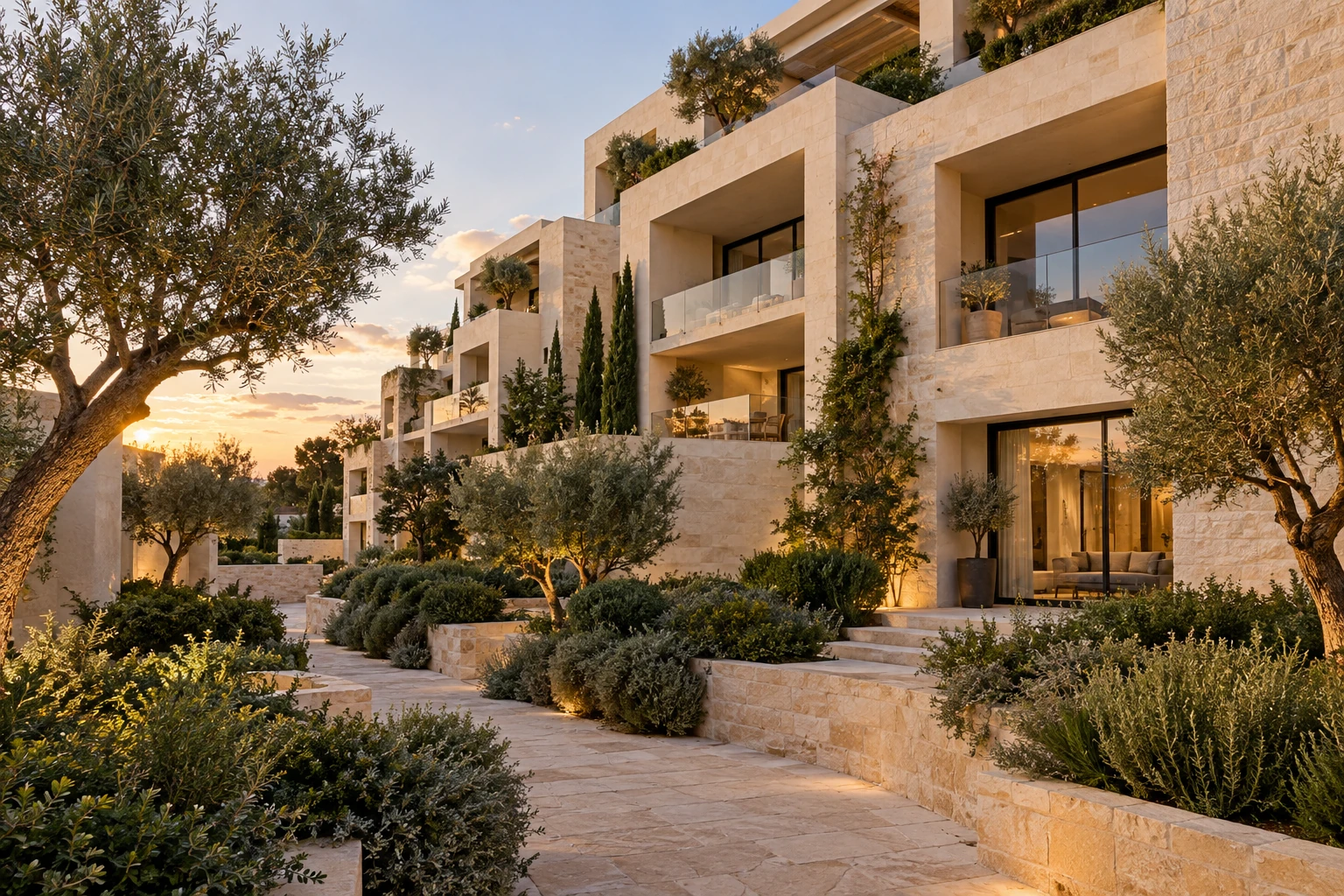
Architectural visualization can support off-plan property sales by turning current design information into images, animation and interactive presentations that prospective buyers can understand before a building is complete. It helps explain the proposal when a visit to the finished property is not yet possible.
Plans, elevations and specifications remain essential, but buyers may find it difficult to connect them into a picture of the exterior, interiors, amenities and setting. A coordinated set of visuals can make those relationships clearer and give sales teams a useful basis for discussion.
The strongest approach starts with the buyer's questions and the project's current documentation. It does not depend on a single dramatic hero image. This guide explains which assets to commission, what information to provide, how to organize approvals and where marketing CGI needs clear limits.
The same approval discipline matters in product visualization before a prototype. When planning a property film, the animation-versus-stills comparison also offers a useful way to decide which information needs motion.
Key takeaways
- Architectural visualization can help buyers understand an off-plan property and its proposed surroundings.
- Visual content can be prepared before completed spaces are available for photography, if the design is sufficiently defined.
- Images should be checked against the relevant project revision and confirmed specification.
- Optional upgrades, illustrative styling and unresolved details need clear treatment.
- An internally approved design is not the same as planning permission or authorization to build.
What is architectural visualization for property marketing?
Architectural visualization creates digital representations of buildings and spaces using CAD drawings, Building Information Modeling data, floor plans, elevations, sections, material schedules and other design references.
Deliverables can include exterior renders, interior CGI, elevated site views, amenity images, architectural films, 360° panoramas and interactive presentations. Each format should explain something useful about the development rather than simply add another asset to the campaign.
Autodesk identifies the communication of technical designs and presentation to potential buyers as uses of architectural visualization. Its architectural visualization overview describes those applications; it does not establish a sales outcome for an individual project.
Here, an approved design means the revision the project team has confirmed for visualization. Planning status, building permissions and contractual commitments must be established separately through the appropriate project records.
How does visualization support off-plan sales?
It translates project information into understandable views
A floor plan shows room relationships and dimensions. An interior render can help a buyer relate that information to furniture, openings, materials and views. The two work best together.
For example, a living-room image can show the relationship between a kitchen, seating area and terrace. The accompanying plan still needs to identify the layout and measurements. Camera choice should support understanding; an exaggerated wide-angle view can create an unhelpful impression of scale.
It makes earlier content preparation possible
When the design is sufficiently defined, CGI production can run alongside development. Teams can prepare launch pages, brochures, listing images, presentation materials and sales-gallery content before the completed building can be photographed.
This is a production-timing benefit, not a guarantee of faster sales. Commercial results also depend on the property, market conditions, pricing, availability and the wider campaign. The practical goal is to have useful, current material ready for the intended launch.
It connects individual spaces with the wider development
An exterior image can explain the entrance and façade. Interiors can show the proposed material palette and room relationships. Elevated views can place buildings, access routes, landscaping and amenities in context.
For terraces, pools, gardens and shared spaces, clarify which elements are included in the scheme and which are illustrative. Surrounding buildings, roads and neighboring land should reflect reliable information rather than an idealized setting invented for the image.
It supports a consistent campaign
A shared scene and agreed visual direction can keep architecture, finishes and styling consistent across channels. The same project may support a website hero, brochure crops and presentation graphics, with additional preparation for motion or interactive use.
Reuse still requires review. A crop can remove an important qualification or hide surrounding context. A film can show a space that has since changed. The current design revision should remain identifiable throughout the asset set.
Which visuals are most useful before construction is complete?
Choose the smallest useful set that answers the main buyer questions. A development with several buildings may need site context; a single apartment may benefit more from clear interiors and a well-presented plan.
| Visual | What it can explain | Useful applications |
|---|---|---|
| Exterior hero render | Architecture, entrance, façade and landscape | Launch pages, brochures and listings |
| Interior render | Layout, finishes, furniture scale and spatial character | Apartments and important shared spaces |
| Aerial or elevated view | Site relationships, access and amenities | Multi-building developments and masterplans |
| Amenity image | The proposed use and character of shared facilities | Lobbies, pools, gyms and gardens |
| Architectural animation | Connections and movement between spaces | Launch films and sales presentations |
| 360° or interactive presentation | Exploration from selected positions or viewpoints | Sales environments where self-guided viewing is useful |
Animation is helpful when movement adds information. A concise set of stills may be sufficient when the main questions concern appearance, materials and layout. An interactive presentation is most useful when its controls and available views genuinely help someone explore the proposal.
Agree viewing conditions early. A large sales-suite screen, a mobile listing and a printed brochure need different crops and levels of visible detail. Check whether labels remain legible and whether the important parts of a scene survive each format.
What should the developer provide?
A clear, current source package helps the studio identify what is known, what needs interpretation and what requires a decision before production.
| Category | Useful information |
|---|---|
| Architecture | Current CAD or BIM, plans, elevations, sections, dimensions, façade details and revision references |
| Interiors and materials | Finish schedules, kitchen and bathroom specifications, joinery, fixtures, lighting and styling direction |
| Site and landscape | Site plan, levels, topography, access, neighboring context, planting and verified view references |
| Marketing | Audience, positioning, priority spaces, channels, formats, deadlines and brand guidance |
| Status and approvals | Named reviewers, unresolved decisions, optional packages and the status of relevant permissions |
Do not silently fill gaps with attractive assumptions. If the terrace balustrade is undecided, identify it as an open item. If several apartment types are involved, map each image to the relevant unit or clearly identified representative layout.
Reference photographs can help establish surrounding context, but the camera position and date matter. A view from a nearby rooftop is not automatically the view from a particular apartment. If a visual is intended to represent a specific outlook, provide suitable verified information for that location.
How is architectural marketing CGI produced?
1. Define the communication objective and review the files
List the questions each image should answer, then check the design revision, materials, site information and unresolved details. Assign a reviewer for architecture, another for marketing where appropriate, and a clear route for resolving conflicting comments.
BIM can provide coordinated project information, but a BIM model is not automatically a finished marketing scene. Autodesk's BIM for architecture overview describes its role in representing and coordinating a project. Visualization still requires suitable geometry, materials, context and presentation work.
2. Prepare the scene
The studio organizes available geometry and models missing visible elements from confirmed references. Landscape, furniture, fixtures and surrounding context are added at the level required by the selected views.
Distinguish fixed elements from styling. A kitchen layout, a permanent partition and a decorative chair have different implications for the buyer. Keeping those categories clear makes review more useful and helps avoid presenting an optional item as part of the standard specification.
3. Approve cameras, materials and visible design details
Review low-detail previews before committing to final rendering. Confirm camera positions, room relationships, façades, windows, finishes, landscape and any optional packages.
Consolidate feedback into one agreed revision. A camera approval should not be treated as material approval, and a marketing team's preference should not silently change the design. Record who resolved each substantive question and which source revision the decision follows.
4. Produce and check the final outputs
After approval, prepare the agreed stills, animation or interactive assets. Review the delivered images against the source revision, including fixed elements, signage, context, optional upgrades and crops.
Also check captions and surrounding copy. An image of a representative apartment needs an appropriate description. If a design change affects several assets, identify the whole affected set rather than updating only the most prominent image.
Can visualization also help with design review?
Yes, within a defined scope. A preview may help the project team notice an awkward material transition, a furniture-layout issue or a mismatch between the model and the latest drawings. It can provide a shared visual reference for discussion before the final marketing assets are produced.
Treat such observations as questions for the responsible designers. A marketing render is not a structural assessment, a building-compliance review, a coordinated clash check or a validated daylight study. Attractive simulated sunlight does not establish actual daylight performance.
If design review is part of the commission, agree what will be examined, who will decide and how accepted changes reach the source documents. Otherwise, visualization feedback can drift into undocumented design changes that later appear in sales material.
How accurate should marketing renders be?
The building and advertised specification should remain tied to confirmed information. Art direction can shape atmosphere, styling and lighting, but it should not quietly alter room dimensions, window locations, material packages or site relationships.
Review the likely impression of the whole image. Mature trees, unusually empty surroundings or a view that omits an obstruction may affect expectations even if the building model itself is correct. Distinguish illustrative planting, loose furniture and optional features where needed.
UK CAP guidance addresses how optional upgrades and relevant qualifications should be presented in new-build and off-plan advertising. It is a UK advertising reference, not Spanish law. See the ASA/CAP guidance. For promotion in Spain, the responsible team should check the applicable Spanish requirements rather than treating that UK example as a local rule.
The project's planning and permission status also needs separate verification. Approval of a render or design by a developer does not establish planning permission, construction authorization or the final contractual specification. Marketing CGI should support the documents that explain those matters, not stand in for them.
What affects production effort and timing?
The main factors are source-file quality, project scale, visible detail and the stability of the design. More views, complex landscaping, detailed interiors, animation and additional output formats can expand the work.
Late changes can affect several stages at once. A revised façade may require model updates, new materials and replacement images across the campaign. Agree how changes will be identified and approved before final production begins.
For a larger development, a few representative views can establish the standard before the remaining set is produced. This may make later reviews more focused, but the schedule still depends on timely decisions and the actual scope. A project-specific brief is more useful than a universal price or turnaround promise.
Hypothetical example: planning a residential launch
Consider a residential development being marketed before completion. This is an illustrative planning example, not a client case study or evidence of sales performance.
The team identifies three questions: what the arrival looks like, how the principal living spaces relate to one another, and where shared facilities sit within the site.
An exterior view explains the entrance and architecture. Two interior views show the living area and its connection to the kitchen or terrace. An amenity view presents a confirmed shared facility, and an elevated image explains site relationships.
Each image is mapped to the current design revision and relevant specification. Optional styling is identified, and unresolved details are held for approval. Website and brochure crops are checked together so that the presentation stays consistent.
The same prepared project can provide a starting point for a short launch film, although additional modeling, camera planning and rendering may be necessary. The useful outcome is a coordinated explanation of the proposal, not a predicted increase in sales.
When is visualization not enough?
Buyers still need appropriate plans, dimensions, written specifications, availability information, permission status and contractual documents. Other relevant information may include ownership arrangements, ongoing charges and verified details about the surrounding area.
A render cannot establish those facts. It should help the buyer understand the proposal and identify questions to discuss with the sales team.
As construction progresses, photography can document completed areas and actual views. A campaign may combine photography with CGI for unfinished spaces, provided each is identified appropriately and the material remains current.
Frequently asked questions
Can architectural visualization begin before construction starts?
Yes, if drawings, dimensions and material information define the proposal sufficiently. Early concept imagery should remain clearly identified when important decisions are unresolved. Creating a render does not establish permission to build or market the development.
Is BIM required?
No. CAD, plans, elevations, sections and reliable references can also support production. The important question is whether the information is complete and consistent enough for the required views.
Can CGI match the completed building exactly?
It can represent the confirmed information available at production time, but cannot guarantee an identical completed result. Design changes, substitutions, construction tolerances, planting and actual light conditions can create differences. Update the campaign and use appropriate qualifications where required.
Does better CGI guarantee more sales?
No. Clear visuals can support understanding and conversation, but they do not isolate or guarantee a commercial result. Evaluate their usefulness alongside the rest of the campaign and the property offer.
Planning visuals for an off-plan development
Start with the buyer's questions, the current design and the information that can be confirmed. Select views that explain the proposal, organize approvals and maintain the visual set as the project changes.
To discuss a coordinated set of images or animation for an unbuilt development, explore our architectural visualization services.
Put the thinking into practice.
Explore the relevant studio service, then tell us what you are planning.
Explore the service